Manual
A small 3D engine with 2D support, written in Java. Fixed 60 Hz logic, no allocation while the game runs, OpenGL ES 1.x and 2.0 backends. The engine core is pure Java and knows no platform; the same game code runs on Android and on Windows, Linux and macOS through two platform layers. This manual describes what each part of the engine does, where it lives and how to use it. Everything platform specific is collected in 13 (the contract and Android) and 14 (desktop); elsewhere it appears only as short notes. Every public class and member is listed in Api.
- Overview
- Getting started
- Core
- Rendering
- 2D and UI
- Scene and content
- Collisions and physics
- Effects and cutscenes
- Audio, storage and network
- Diagnostics and quality
- Tools
- Build and tests
- Platform layers
- Desktop: Windows, Linux, macOS
1. Overview
Features
- One engine, several platforms: Android and desktop (Windows, Linux, macOS) run the same
Screenclasses. - Fixed 60 Hz logic loop, math and memory tools (
Engine,Mat4,Pool,TextBuffer). - Two graphics backends behind one interface: OpenGL ES 1.x (fixed pipeline) and OpenGL ES 2.0 (shaders), chosen automatically where both exist.
- 2D: sprites, frame animation, bitmap fonts, a UI layer (buttons, toggles, sliders, pages).
- 3D: scene graph, frustum culling, one directional light, baked lightmaps, fog, sky, billboards, particles.
- A model format (MDL2, and MDL1 still readable), a level format, converters from OBJ and glTF, a lightmap baker.
- Collisions, ray picking, a small rigid body world.
- Sound (effects and music), settings, saved state, pointer input (touch, multi-touch, mouse).
- Simple HTTP and HTTPS for slow but reliable fetching and sending of small data (
Http: GET and POST): background thread, timeouts, retries, redirects. - Cutscene tools (camera tracks, timelines), a profiler, a benchmark, an automatic quality governor.
Architecture
your game (Screen classes)        knows the engine only
platform layer                    one per platform: window or view, renderer, audio, storage, assets, input
  skarph-android                  Android: EngineView, GLES1 / GLES2 renderers, audio, storage, assets
  skarph-desktop                  Windows, Linux, macOS: GLFW window, OpenGL (LWJGL), OpenAL, files
skarph-core (pure Java)           loop, math, scene, physics, UI, effects; no platform classes
Dependencies point one way: the core never knows the platform, the engine never knows your game. The core, the physics,
the UI and the demo screens therefore run in a plain JVM, which is how the tests work without a device or a window. To port the
engine, implement Renderer, Assets, Audio and Storage and feed InputQueue (see 13).
2. Getting started
Set up a project
A game is a set of Screen classes plus data files (assets/). Only the few lines that start the engine depend on the platform.
Android
- Create a project with
minSdkVersion="3"(addandroid:screenOrientation="landscape"for landscape games). - Add the source folders
skarph-core/srcandskarph-android/src. - Put your data files into the app
assets/folder. - No permissions are needed, except
INTERNETwhen the program usesHttp(section 9).
To get an APK without an IDE, lay the program out like the folders in demos/ (AndroidManifest.xml, src/, assets/,
res/) and run skarph-android/build-android.sh YOUR_FOLDER --sdk ~/Android/Sdk (section 12): it compiles
the engine together with your sources and writes a signed APK.
Desktop (Windows, Linux, macOS)
- Put your classes and your data files (
assets/) into folders of your choice. skarph-desktop/build-desktop.sh GAME_CLASS ...compiles the engine, the desktop layer and your classes into one jar that runs everywhere (section 14).
Sound files: .ogg and .wav work on every platform; .mp3 only on Android.
Smallest working app
A big cube you can turn with a finger (or the mouse), with 8 small cubes orbiting it. This screen knows only the engine, so it is the same on every platform:
public final class CubeScreen extends ScreenAdapter {
    private Engine engine;
    private int cubeMesh;
    private final Mat4 projection = new Mat4();
    private final Mat4 view = new Mat4();
    private final Mat4 model = new Mat4();
    private final InputEvent event = new InputEvent();      // created once, reused for every event
    private float angleY;
    private boolean dragging;
    private float lastX;

    public void init(Engine engine, Renderer renderer) {     // allocate EVERYTHING here
        this.engine = engine;
        cubeMesh = renderer.createMesh(Shapes.cube(1f));
        view.setLookAt(0f, 3f, 9f,  0f, 0f, 0f,  0f, 1f, 0f);
    }

    public void update() {                                   // 60 times per second, no "new"
        while (engine.input.poll(event)) {                   // touch events of this tick
            if (event.type == InputEvent.DOWN) { dragging = true; lastX = event.x; }
            else if (event.type == InputEvent.UP) dragging = false;
            else if (event.type == InputEvent.MOVE && dragging) {
                angleY += (event.x - lastX) * 0.5f;          // drag to turn the cube
                lastX = event.x;
            }
        }
        if (!dragging) angleY += 1f;                         // exactly 60 degrees per second
    }

    public void render(Renderer r) {                         // once per frame, no "new"
        projection.setPerspective(45f, (float) r.getWidth() / r.getHeight(), 0.5f, 50f);
        r.clear(0.08f, 0.09f, 0.12f);
        r.setCamera(projection, view);
        model.setIdentity();
        model.rotate(angleY, 0f, 1f, 0f);
        model.scale(2f, 2f, 2f);
        r.drawMesh(cubeMesh, model);
    }
}
A platform launcher creates the Engine, sets the first screen and connects the engine to a window.
Android: the Activity hands the engine to an EngineView:
public final class MainActivity extends Activity {
    private EngineView view;

    protected void onCreate(Bundle state) {
        super.onCreate(state);
        requestWindowFeature(Window.FEATURE_NO_TITLE);
        getWindow().setFlags(WindowManager.LayoutParams.FLAG_FULLSCREEN,
                WindowManager.LayoutParams.FLAG_FULLSCREEN);
        Engine engine = new Engine();
        engine.setScreen(new CubeScreen());
        view = new EngineView(this, engine);          // picks ES 2.0 or ES 1.x by itself
        setContentView(view);
    }
    protected void onPause()   { super.onPause();  view.onPause(); }
    protected void onResume()  { super.onResume(); view.onResume(); }
    protected void onDestroy() { view.destroy(); super.onDestroy(); }   // releases the sound players
}
Desktop: a class that implements Game names the window and returns the first screen; the launcher in the jar does the rest
(the mouse is one finger, so the cube turns by dragging):
public final class CubeGame implements Game {
    public GameConfig config() {
        GameConfig c = new GameConfig();
        c.title = "Cube"; c.appName = "cube";           // appName: folder of the saves
        return c;
    }
    public Screen createScreen(Engine engine) { return new CubeScreen(); }
}
Either way, the platform layer installs the platform services into the engine: Assets, Audio and Storage.
Screen lifecycle
| Callback | Called | Used for |
|---|---|---|
init(Engine, Renderer) | once, on the render thread, before the first frame | create meshes, textures, pools, UI |
update() | 60 times per second | game logic, input |
render(Renderer) | once per frame | drawing |
pause() / resume() | the app is paused / resumed (Android: sent to the background and back; desktop: window minimized or closed, and restored) | save here: the app may be closed without further notice |
dispose() | when another screen replaces this one | free what you own |
engine.setScreen(newScreen) takes effect at the start of the next frame.
3. Core
Classes: Engine, Screen, ScreenAdapter, TickClock, InputEvent, InputQueue, TouchState, TouchDecoder,
Stats, Vec3, Mat4, FastMath, Pool, IntList, IntIntMap, TextBuffer.
Time model: ticks
TickClock guarantees exactly 60 logic ticks per second.
Screen.update()takes no delta time. Count ticks:angle += 1fper tick is 60 degrees per second.- Logic is not tied to the frame rate: at 30 FPS the engine runs 2 ticks per frame, at 120 FPS a tick every second frame.
- After a long stall at most
TickClock.MAX_CATCHUP_TICKS(5) ticks run at once and the rest is dropped. Below about 12 FPS the game therefore runs slower than real time. - Physics velocities are units per tick, gravity is units per tick squared.
- Wrap tick counters at a multiple of the period of everything that uses them.
Engine
Engine engine = new Engine();
engine.setScreen(new MyScreen());      // applied at the start of the next frame
engine.input                           // InputQueue, filled by the platform layer
engine.stats                           // fps, tps, nowNanos
engine.getAssets() / getAudio() / getStorage()     // installed by the platform layer; never null
engine.pause(); engine.resume();       // forwarded by the platform layer; pause music and loops
Stats.fps and Stats.tps change once per second (stats.changed becomes true). Stats.nowNanos is the time stamp of
the current frame, so a screen can read the frame time without its own clock. The platform layer logs FPS and TPS
(Android: logcat, tag skarph; desktop: the console, lines starting with skarph:).
Input
engine.input is a ring buffer of 256 events written by the platform's input thread and read in update().
private final InputEvent event = new InputEvent();       // once, in init()

public void update() {
    while (engine.input.poll(event)) {
        switch (event.type) {                             // DOWN, MOVE, UP
            case InputEvent.DOWN: dragging = true;  lastX = event.x; break;
            case InputEvent.MOVE: if (dragging) { angleY += (event.x - lastX) * 0.5f; lastX = event.x; } break;
            case InputEvent.UP:   dragging = false; break;
        }
    }
}
Coordinates are pixels, origin top-left. When the queue is full, MOVE events are dropped; DOWN and UP never are.
Every event carries event.pointer, the pointer id: the finger on a touch screen, always 0 for the mouse on desktop.
Multi-touch. TouchState turns the event stream into a simple model:
TouchState touch = new TouchState();                  // init()
while (engine.input.poll(event)) touch.feed(event);

touch.getDownCount();                  // fingers down
touch.isDown(id); touch.getX(id); touch.getY(id); touch.getDragDistance(id);
touch.getPointerId(n);                 // id of the n-th finger that is down (ascending)
touch.getPinchDistance();              // distance between exactly two fingers, else -1
float d = touch.consumePinch();        // change since the last call: + apart, - together
Single-pointer code keeps working: it only reads pointer 0, which is also the desktop mouse (left button). TouchDecoder is
the platform-independent part that turns raw touch data into events.
Math
Vec3 and Mat4 work in place and return this; they never allocate. Mat4 is column-major (OpenGL layout).
| Mat4 method | Meaning |
|---|---|
setIdentity(), set(other) | reset, copy |
translate(x, y, z), scale(x, y, z) | multiply from the right |
rotate(deg, x, y, z), rotateX/Y/Z(deg) | rotation in degrees; rotateX/Y/Z are faster |
multiply(a, b) | this = a * b |
setPerspective(fovyDeg, aspect, near, far), setOrtho(l, r, b, t, near, far) | projections |
setLookAt(ex, ey, ez, cx, cy, cz, ux, uy, uz) | view matrix: eye, target, up |
setInverse(src) | general 4x4 inverse, false for a singular matrix |
transformPoint(Vec3) | apply to a point in place |
Order follows OpenGL: translate then rotate means "rotate first, then translate". One orbiting cube:
model.setIdentity();
model.rotate(a, 0f, 1f, 0f);          // swing around the center
model.translate(4.5f, 0f, 0f);        // distance from the center
model.rotate(orbitTick * 2f, 1f, 1f, 0f);   // tumble
model.scale(0.6f, 0.6f, 0.6f);
r.drawMesh(cubeMesh, model);
FastMath.sin(deg) / cos(deg) are table based (error below 3e-6) and much cheaper than Math.sin/cos on old CPUs.
Memory tools
| Class | Use |
|---|---|
Pool<T> | fixed size, filled at construction by a Pool.Factory<T>. obtain() returns null when empty, free(obj) returns an object (Pool.Poolable.reset() is called if implemented), getFreeCount() |
IntList(capacity) | add, get, set, size, clear, indexOf, contains, removeAt (keeps order), removeSwap (O(1)) |
IntIntMap(capacity) | open addressing map int to int: put, get(key, default), containsKey, remove, size, clear |
TextBuffer(capacity) | preallocated text builder: clear(), append(String / int / long / char / float, decimals); only toString() allocates |
All have a fixed capacity and never allocate after construction. Use TextBuffer instead of + for text that changes:
text.clear().append("FPS ").append(engine.stats.fps).append("  TPS ").append(engine.stats.tps);
font.draw(batch, text, 8f, 8f);
4. Rendering
Classes: Renderer, Camera, Shapes, MeshData, Sky, GLES1Renderer, GLES2Renderer.
The Renderer interface
All drawing goes through skarph.core.Renderer. Meshes and textures are int handles, so a screen survives the loss of
the GL context (the renderer rebuilds everything after the context is lost, for example when an Android app returns from the background).
int  createMesh(MeshData data);                       // init time only
int  loadTexture(String assetPath, boolean smooth, boolean repeat);   // PNG from assets/
void clear(float r, float g, float b);                // start of the frame, resets the counters
void setCamera(Mat4 projection, Mat4 view);
void drawMesh(int mesh, Mat4 model);
void deleteMesh(int mesh);  void deleteTexture(int texture);
Limits: 64 meshes and 32 textures at the same time (ResourceManager, 6, manages them for you).
Handles of deleted objects are reused.
Meshes and shapes
int cube   = renderer.createMesh(Shapes.cube(1f));                          // a color per face
int cube2  = renderer.createMesh(Shapes.cube(1f, 0.8f, 0.2f, 0.2f));        // one color
int sphere = renderer.createMesh(Shapes.sphere(0.5f, 12, 8, 0.9f, 0.9f, 0.9f));   // radius, segments, rings, rgb
Shapes meshes have normals, so they are lit. MeshData accepts your own positions, normals, vertex colors and up to two
sets of texture coordinates. Bounding radius: sphere = radius, cube = size * 0.866. For real models use MDL2 files
(6).
Camera
Camera camera = new Camera();                                       // init()
camera.setPerspective(50f, aspect, 0.5f, 100f);                     // fovy (degrees), aspect, near, far
camera.lookAt(ex, ey, ez,  cx, cy, cz,  0f, 1f, 0f);               // eye, target, up
renderer.setCamera(camera.projection, camera.view);
camera.isSphereVisible(x, y, z, radius);                            // manual culling test
Every setter refreshes the view frustum, which Scene uses for culling. An orbit camera:
float ex = FastMath.sin(camAngle) * camRadius;
float ez = FastMath.cos(camAngle) * camRadius;
camera.lookAt(ex, camHeight, ez, 0f, 0f, 0f, 0f, 1f, 0f);
Textures
- Width and height must be powers of two. Other sizes are rejected with a log line (tag
skarph) andloadTexturereturns-1. 256 x 256 or 512 x 512 is safe everywhere. smooth = falseis nearest filtering (crisp pixels, fastest),trueis linear.repeat = truetiles the texture.- The image is decoded without scaling, uploaded, and the decoded copy is released at once.
Light
One directional light plus ambient, per vertex on ES 1.x and per pixel on ES 2.0. Only meshes with normals are lit.
renderer.setLighting(true);
renderer.setDirectionalLight(-0.5f, -1f, -0.4f,  0.9f, 0.9f, 0.85f);   // direction the light travels, color
renderer.setAmbientLight(0.38f, 0.38f, 0.42f);
With a Scene, set scene.lightingEnabled, lightDx/Dy/Dz, lightR/G/B, ambientR/G/B instead. Meshes that carry a
lightmap are never lit dynamically (the light is baked in). There are no real shadows, see
blob shadows.
Fog
r.clear(0.55f, 0.65f, 0.80f);                          // use the fog color as the clear color
r.setFog(true, 45f, 150f, 0.55f, 0.65f, 0.80f);        // enabled, start, end, color
// ... draw meshes ...
r.setFog(false, 0f, 0f, 0f, 0f, 0f);
Linear fog: unchanged before start, pure fog color from end. It applies after dynamic light and lightmaps. Sprites and
UI quads are never fogged; additive billboards fade to black. end <= start means "no fog". A near far plane saves fill
rate on weak GPUs and the fog hides the cut. The setting survives a lost GL context.
Sky
A low-poly dome with a vertex color gradient: one draw call, no texture.
Sky sky = new Sky(r, 100f, 12, 6,              // renderer, radius, segments, rings
        0.25f, 0.45f, 0.85f,                    // zenith
        0.75f, 0.85f, 0.95f,                    // horizon
        0.45f, 0.50f, 0.55f);                   // nadir

// render()
r.clear(0.75f, 0.85f, 0.95f);
r.setCamera(proj, view);
sky.draw(r);                                    // FIRST: later draws cover the sky
The sky follows the camera (the view translation is dropped) and ignores depth, light and fog. Its radius must lie between
the near and far plane. Use the horizon color as clear and fog color so distant terrain melts into the sky.
sky.release(r) frees the mesh.
Draw statistics
r.clear(0f, 0f, 0f);                // resets the counters
// ... draw the frame ...
int calls = r.getDrawCalls();       // meshes + batches since clear()
int tris  = r.getTriangles();
Both backends count the same way. For a ready-made text see Profiler (10).
Backends
The same Renderer interface runs on two backends. The ES 2.0 backend runs on Android and on the desktop; the ES 1.x backend
exists for old Android devices:
ES 1.x (GLES1Renderer) | ES 2.0 (GLES2Renderer) | |
|---|---|---|
| Lighting | per vertex | per pixel |
| Normals under non-uniform scale | normalized only | correct (normal matrix) |
| Vertex buffers (VBO) | only on ES 1.1 hardware | always, one interleaved buffer per mesh |
| Lightmaps | needs 2 texture units | always |
| Where it runs | Android API 3 and newer | Android API 9 and newer with an ES 2.0 GPU; desktop with OpenGL 2.1 or newer |
renderer.getBackendName();                                       // "OpenGL ES 2.0 (shaders)"

// Android: the choice is made when the view is created
new EngineView(this, engine);                                    // BACKEND_AUTO: ES 2.0 if possible
new EngineView(this, engine, EngineView.BACKEND_GLES1);          // force the fixed pipeline
view.getBackend();                                               // what is really used
On the desktop there is only the ES 2.0 backend, so there is nothing to choose. Choosing the backend, fallback and the shader set: 13.
5. 2D and UI
Classes: SpriteBatch, TextureRegion, FrameAnimation, BitmapFont, Ui.
TextureRegion and sprite sheets
A TextureRegion is a rectangle inside a texture. Create them once in init():
int tex = renderer.loadTexture("atlas.png", false, false);
int w = renderer.getTextureWidth(tex), h = renderer.getTextureHeight(tex);
TextureRegion[] cells = TextureRegion.grid(tex, w, h, 32, 32, 4, 4);        // 4 x 4 cells of 32 x 32, row-major
TextureRegion one = new TextureRegion().set(tex, w, h, 0, 0, 32, 32);       // x, y from the top-left corner
With linear filtering leave one transparent pixel between sprites to avoid color bleeding.
SpriteBatch
Collects sprites and sends them in as few draw calls as possible (one per texture change, or when full).
SpriteBatch batch = new SpriteBatch(renderer, 1024);          // init(); at most 1024 sprites per flush

// render()
projection.setOrtho(0f, virtualW, 320f, 0f, -1f, 1f);          // y points down; virtual height 320
batch.begin(projection);                                       // replaces the camera
batch.setColor(1f, 1f, 1f, 1f);                                // tint + alpha for the following sprites
batch.draw(region, x, y);                                      // native size
batch.draw(region, x, y, w, h);                                // scaled; a negative w or h flips the sprite
batch.drawRotated(region, cx, cy, w, h, angleDeg);             // around its center
batch.end();
- A fixed virtual height (for example 320 units) with a width from the aspect ratio looks the same at every resolution.
- Alpha blending is on and the depth test is off. 3D meshes drawn before the batch stay visible behind it (HUD).
begin()replaces the camera: afterend()callrenderer.setCamera(...)again before drawing 3D meshes.batch.getDrawCalls()reports the calls sincebegin().
FrameAnimation
Frame by frame, counted in ticks, stateless:
FrameAnimation walk = new FrameAnimation(frames, 8, true);   // frames, ticks per frame, loop
TextureRegion f = walk.getFrame(tick + offset);              // you keep the tick counter
walk.isFinished(tick);                                       // non-looping only
One animation serves any number of sprites; give each its own offset so they are out of step. Particles use the same class (the frame follows the particle age).
BitmapFont
A fixed-width font from a sprite sheet; characters are in code order from firstChar.
TextureRegion[] glyphs = TextureRegion.grid(fontTex, fw, fh, 8, 16, 16, 6);   // 16 x 6 cells of 8 x 16
BitmapFont font = new BitmapFont(glyphs, 32);          // the sheet starts at ASCII 32
font.draw(batch, "Hello", x, y);                       // String literal
font.draw(batch, textBuffer, x, y);                    // TextBuffer: no allocation
font.setScale(2f);
'\n' starts a new line; characters outside the sheet are blank. Tint with batch.setColor before drawing; draw the text
twice with a one unit offset and a dark color for a drop shadow. font.getTextWidth(chars) and getLineHeight() help to
align.
UI layer
Widgets: panel, label, button, toggle, slider. They are drawn with the SpriteBatch and BitmapFont
(solid rectangles are a tinted white square cut from any texture). Everything is created in init(); text lives in
preallocated TextBuffers, so touching, changing text and drawing never allocate.
Frames drawn by tests/UiSnapshots.java, a small CPU renderer used to check layouts without a device.
// init()
ui = new Ui(32, 64, batch, font, white);                  // max widgets, characters per text, ..., 8 x 8 white region
ui.setListener(this);                                     // implements Ui.Listener
ui.setViewport(virtualW, 320f, screenW, screenH);         // again whenever the screen size changes

int title = ui.addLabel("ENGINE DEMO", 0f, -100f, Ui.CENTER, Ui.MIDDLE, 3f);
int play  = ui.addButton("PLAY", 0f, -10f, 220f, 48f, Ui.CENTER, Ui.MIDDLE, 2f);
int music = ui.addToggle("MUSIC", -85f, 62f, 160f, 36f, Ui.CENTER, Ui.MIDDLE, 1f, true);
int vol   = ui.addSlider(0f, -42f, 320f, 24f, Ui.CENTER, Ui.MIDDLE, 0.6f);      // initial value 0..1
int back  = ui.addButton("BACK", -8f, 8f, 110f, 36f, Ui.RIGHT, Ui.TOP, 1f);

ui.setGroup(title, PAGE_MENU);                            // pages
ui.setGroup(back, PAGE_SETTINGS);
ui.showGroup(PAGE_MENU);

// update(): give the UI every event first
while (engine.input.poll(event)) {
    if (ui.handle(event)) continue;                       // true: the touch belongs to the UI
    touch.feed(event);                                    // game input
}

// render()
batch.begin(projection);  /* sprites */  ui.draw();  batch.end();

public void onClick(int id) {                             // buttons and toggles
    if (id == play) showPage(PAGE_PLAY);
    else if (id == music) musicOn = ui.isChecked(music);
}
public void onValueChanged(int id, float value) {         // sliders
    if (id == vol) audio.setMusicVolume(value);
}
- Virtual coordinates. Positions and sizes use the units of your SpriteBatch projection. Touch events arrive in pixels;
setViewporttells the UI how to convert. - Anchors.
LEFT/TOPmeasure from the left / top edge,CENTER/MIDDLEfrom the screen center (the widget is centered there),RIGHT/BOTTOMfrom the right / bottom edge (use negative offsets). The layout stays right on 4:3, 16:9 and 21:9. - Pages.
setGroup(id, page)puts a widget on a page,showGroup(page)shows one page; widgets of groupUi.ALWAYSare on every page. Switching pages insideonClickis fine. - Touch behavior. A button clicks when it is released inside; sliding out cancels the press and sliding back in restores
it. A disabled widget swallows the touch and does nothing. A blocking panel (
setBlocking) swallows touches too (dialogs). A gesture that starts on empty space is never consumed, so the game sees all of it. Each finger can hold its own widget. - Text and state.
ui.text(id).clear().append("FPS ").append(fps),setText,setEnabled,setVisible,setChecked/isChecked,setValue/getValue,isPressed. - Style. The public color arrays (
colButton,colButtonDown,colOn,colOff,colPanel,colText, ...) are plain{r, g, b, a}and can be changed.
Limits: fixed-width bitmap text, one line per button, no scrolling lists, no text input; widgets are drawn in creation order.
6. Scene and content
Classes: Scene, Node, Camera (culling), ModelFormat, ModelData, ResourceManager, Level, LevelLoader, Assets.
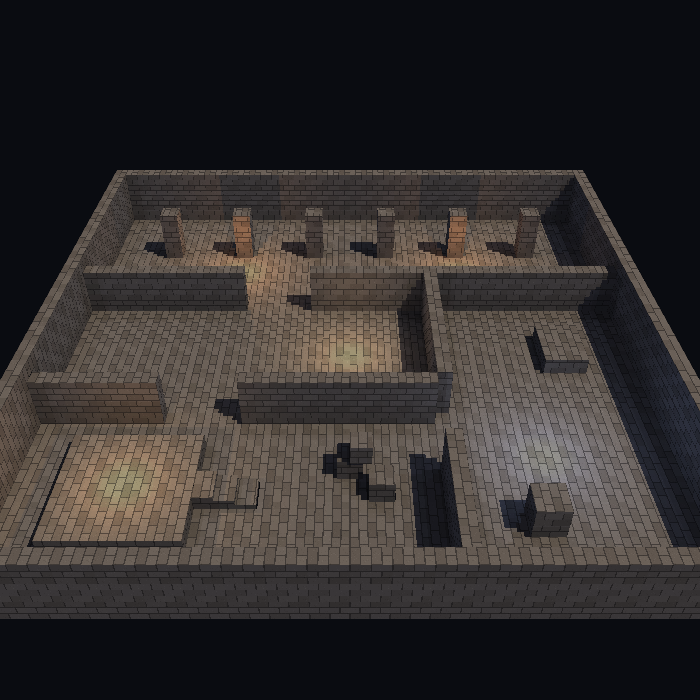
A level rendered by tools/preview_level.py: diffuse texture x baked lightmap.
Scene and Node
A Scene is a tree of nodes with a fixed capacity; all nodes are created up front, so createNode and destroyNode
never allocate.
Scene scene = new Scene(512);                 // init()
Node a = scene.createNode(null);              // null = child of the root; returns null when full
Node b = scene.createNode(a);                 // child of a
b.mesh = cubeMesh;                            // handle from renderer.createMesh()
b.boundRadius = 0.866f;                       // bounding sphere radius in local units
b.setPosition(0f, 5f, 0f);
scene.update();                               // once after building the scene in init()

// every tick
a.setRotation(0f, angle, 0f);                 // children follow
scene.update();                               // recomputes only the nodes that changed

// every frame
scene.render(renderer, camera);               // culls and draws
- Transform:
world = parent.world * Translate * RotateY * RotateX * RotateZ * Scale. Angles in degrees. Children inherit position, rotation, scale and visibility. - Change transforms only through
setPosition,setRotation,setScale(they mark the node dirty). The public fields may be read, never written. node.visible = falsehides the node and its subtree.scene.destroyNode(node)frees the subtree.- Group nodes (
mesh = -1) are free: use them as pivots (for example pivot -> holder -> planet + moon pivot -> moon). - A scaled parent scales its children's offsets: to scale only a mesh, put it on a child of an unscaled holder.
- Statistics of the last render:
scene.statTotal,statDrawn,statCulled.
Culling
Scene.render skips nodes whose bounding sphere (boundRadius * largest world scale) is completely outside the camera
frustum. scene.cullingEnabled = false turns it off. Make boundRadius a little generous, or objects vanish at the screen
edge. Culling is per node; there is no occlusion culling, no sorting and no 3D transparency (use
billboards).
Model files (MDL2 and MDL1)
Two compact little-endian binary formats, parsed straight into arrays. ModelFormat.parse reads both and tells them
apart by the magic, so ResourceManager, levels and your own code never care which one a .mdl file is. New models
should be MDL2: it is about 5 to 10 times smaller (a 4225 vertex terrain: 235 KB as MDL1, 23 KB as MDL2). MDL1 stays
supported for files you already have.
MDL2 (what all tools write by default):
| Part | Size |
|---|---|
magic MDL2, flags (1 byte), vertex count (uint16), index count (uint32) | 11 bytes |
| diffuse texture name, lightmap texture name | 1 byte length + UTF-8, no padding |
| body, deflated (zlib) | everything below |
| positions | 16 bit per axis between the stored min and max (24 bytes of min / max, then x, y, z planes) |
| normals (flag 1) | 2 bytes per vertex (octahedral mapping, unit length again after loading) |
| colors RGBA (flag 2) | 4 bytes per vertex; absent = all white |
| uv0, uv1 (flags 4, 8) | 16 bit per coordinate between the stored min and max |
| indices | difference to the previous index, zigzag + varint (about 1 byte each) |
Flags: 1 normals, 2 colors, 4 uv0, 8 uv1, 16 precise, 32 body is deflated. Precise stores positions, normals and UVs
as float32 (still deflated, about twice the size of the normal MDL2): use it when 16 bit rounding is visible. The rounding
is the model size / 65535: 2.5 mm on a 160 unit terrain, 0.0005 on a 70 unit town. Models are never rounded twice by the
tools: reading and writing a quantized model again gives the same values. The exact layout is in the Javadoc of
ModelFormat.
MDL1 (old, big, exact):
| Part | Size |
|---|---|
magic MDL1, vertex count, index count, flags | 16 bytes |
| diffuse texture name, lightmap texture name | int32 length + UTF-8, padded to 4 bytes |
| positions | 3 floats per vertex |
| normals (flag 1) | 3 floats per vertex |
| colors RGBA (flag 2) | 4 bytes per vertex |
| uv0 (flag 4): diffuse coordinates | 2 floats per vertex |
| uv1 (flag 8): lightmap coordinates | 2 floats per vertex |
| indices | uint16 each (at most 65535 vertices per model) |
v = 0 is the top of the image. A parse error raises IllegalArgumentException with a message (bad magic, truncated
or damaged file, index out of range); every truncated prefix of a valid file is rejected cleanly. Java code can write
models with ModelFormat.writeMdl2(model, precise) (small) and ModelFormat.write(model) (MDL1, exact).
Converters (PC, Python 3)
python3 tools/obj2mdl.py   statue.obj statue.mdl [--scale S] [--diffuse tex.png] [--lightmap lm.png] [--mdl1] [--precise]
python3 tools/gltf2mdl.py  gem.gltf   gem.mdl    [--scale S] [--diffuse tex.png] [--lightmap lm.png] [--mdl1] [--precise]
python3 tools/mdl.py convert old.mdl new.mdl [--mdl1] [--precise]     # MDL1 to MDL2 (or back)
python3 tools/mdl.py info a.mdl b.mdl ...                             # format, counts, size
Every tool that writes a model (these two, bake_level.py, bake_map.py) writes MDL2 and takes the same two options:
--mdl1 writes the old format, --precise writes MDL2 with float32 instead of 16 bit values.
- OBJ: polygons are triangulated;
v/vt/vnforms and negative indices work; missing normals become flat face normals; the materialKdbecomes the vertex color;map_Kdbecomes the diffuse texture name (file name only). - glTF 2.0 (
.gltfor.glb): all triangle primitives are merged; readsPOSITION,NORMAL,TEXCOORD_0,TEXCOORD_1,COLOR_0. Node transforms are ignored: apply them when exporting.
Y is up, front faces are counter-clockwise, indices are 16 bit. Texture names inside the file are looked up in the app assets, so keep them without folders.
ResourceManager
Caches textures and models by name and counts references.
ResourceManager res = new ResourceManager(engine.getAssets(), renderer, 16, 24);   // max textures, max models
ResourceManager.Model m = res.getModel("statue.mdl");        // null on failure, see res.getLastError()
node.mesh = m.mesh;
node.boundRadius = m.boundRadius;
res.releaseModel(m);                                         // frees the mesh and its textures at refcount 0
int font = res.getTexture("font.png", false, false);         // name, smooth, repeat
- Asking for the same file again returns the same GPU resource and reads nothing from disk.
- A model's diffuse texture is smooth and repeating (mipmapped on ES 1.1), its lightmap is smooth and clamped.
- A missing or corrupt file gives
nullplusgetLastError()and leaks nothing. getTextureCount(),getModelCount(),getTotalRefs()are for statistics.
Levels
A text file, one command per line (# starts a comment):
ambient 0.36 0.38 0.44                  # scene ambient light
light -0.4 -0.8 -0.3 0.85 0.80 0.70     # directional light: direction it travels, color
camera 0 0.5 0 42 34                    # orbit target x y z, radius, height (hints for your camera)
object statue.mdl 5 0 3  0 90 0  1 1 1  # model [x y z [rx ry rz [sx sy sz]]]
box 0 1 0  2 1 2                        # physics box: center, half extents [mass]; 0 / missing = static
spawn -10 6 -10                         # spawn point (level.spawns)
scene = new Scene(Level.MAX_OBJECTS + 64);
world = new PhysicsWorld(Level.MAX_BODIES + 80, -26f, 0f, -26f, 26f, 40f, 26f, 3f);
Level level = LevelLoader.load(assets.readBytes("map.lvl"), res, scene, world);   // world may be null
level.getObjectCount(); level.getNode(i); level.getModel(i);
level.spawns[0..2]; level.spawnCount;
level.unload(scene, world, res);                  // removes nodes and bodies, releases the models
- Errors raise
IllegalArgumentException("line N: ...")(unknown command, bad number, missing model) orIllegalStateException(scene or world full). Everything created so far is removed again. - To reload without loading anything twice, load the new copy first and unload the old one afterwards (the models come from the cache).
- Limits per level: 256 objects, 128 physics boxes, 64 spawn points. Share prop models to stay under the object limit.
Lightmaps
Baked lighting: the light of a static level is computed once on the PC and stored in a texture that is multiplied with the diffuse texture. It costs nothing at run time and can contain soft shadows, which real-time light here cannot.
- A model with uv1 and a lightmap name is drawn with two texture units: unit 0 = diffuse (uv0), unit 1 = lightmap (uv1); result = vertex color x diffuse x lightmap.
- Meshes with a lightmap are never lit dynamically. Dynamic objects (props, characters, balls) use the scene light.
renderer.setLightmapsEnabled(false)shows the diffuse texture only.- Without two texture units (
renderer.supportsLightmaps() == false) the lightmap is skipped and the mesh is lit dynamically, so the level still looks reasonable, only flatter. - Lightmap images must be powers of two (the baker writes 256, 512 or 1024). Two lightmaps of 512 x 512 plus two textures of 128 x 128 take about 2.2 MB.
How to bake: 11.
Assets
engine.getAssets().readBytes("name") returns the bytes of a file from assets/ (or null). Loading allocates (it runs
while a level is loaded); update() and render() still must not.
7. Collisions and physics
Classes: Aabb, Ray, RayHit, Collision, Contact, SpatialGrid, PhysicsWorld, Body.
Aabb and Ray
Aabb box = new Aabb().setCenterHalf(cx, cy, cz, hx, hy, hz);
box.overlaps(other);  box.contains(x, y, z);

Ray ray = new Ray().set(ox, oy, oz, dx, dy, dz);        // the direction is normalized
float t  = ray.intersectSphere(cx, cy, cz, r);           // distance along the ray, -1 = miss
float t2 = ray.intersectAabb(box);                       // 0 if the origin is inside
float t3 = ray.intersectPlaneY(9f);
ray.pointAt(t, vec3);
Everything works in place and allocates nothing: create the objects once in init().
Picking with the camera
if (camera.screenToRay(touchX, touchY, screenWidth, screenHeight, ray)) {
    // the ray starts on the near plane and goes into the scene
}
Pixels with the origin at the top left; works for perspective and orthographic cameras. Combine it with
PhysicsWorld.raycast to find the body under a finger.
Narrow phase
Contact c = new Contact();
Collision.sphereSphere(ax, ay, az, ar,  bx, by, bz, br, c);
Collision.sphereAabb(cx, cy, cz, r, box, c);      // the normal points sphere -> box
Collision.aabbAabb(a, b, c);                      // the normal points a -> b
Each returns true on overlap and fills c.nx, c.ny, c.nz (unit normal from the first shape to the second) and c.depth.
SpatialGrid (broad phase)
A uniform 3D grid that finds which objects can touch without testing every pair.
SpatialGrid grid = new SpatialGrid(minX, minY, minZ, cellSize, cellsX, cellsY, cellsZ, maxObjects, maxEntries);
// every tick
grid.clear();
for (...) grid.insert(id, aabb);                       // false if maxEntries is used up
int n = grid.findPairs(pairArray, maxPairs);           // a, b, a, b ... each overlapping pair once (a < b)
int k = grid.query(aabb, idArray);                     // objects overlapping a box
Objects outside the grid are clamped to the border cells and still work. Choose cellSize about the size of a typical
object. maxObjects * 16 is a safe maxEntries. getPairTests() shows how many box tests were needed (compare with
n*(n-1)/2). The results equal the brute-force test (checked in the unit tests).
PhysicsWorld
A small rigid body world of spheres and axis-aligned boxes.
PhysicsWorld world = new PhysicsWorld(256, -12f, 0f, -12f, 12f, 16f, 12f, 3f);
//                                     maxBodies, arena min x y z, arena max x y z, grid cell size
world.createBox(ox, oy, oz, hx, hy, hz, 0f);                 // mass 0 = static obstacle
Body ball = world.createSphere(0f, 5f, 0f, s, 8f * s * s * s);   // x y z, radius, mass
ball.restitution = 0.65f;                                    // bounciness
world.step();                                                // once per tick

RayHit hit = new RayHit();
if (world.raycast(ray, 100f, hit)) { /* hit.body, hit.t, hit.x, hit.y, hit.z */ }
world.destroyBody(ball);
- Units: distances in your units, velocity in units per tick, gravity in units per tick squared (default -0.0055, about 20 units/s^2).
- The arena box gives the walls (x, z) and the floor (
minY). There is no ceiling. - Read and write
body.x/y/zandvx/vy/vzdirectly (for example to kick a body) and copy the position to your scene node every tick. maxSpeed(0.6 units per tick per axis by default) limits the speed; keep it below the size of your smallest body or fast bodies can tunnel through thin static boxes.- Tunables:
gravityY,damping,floorFriction,contactFriction,wallRestitution,solverIterations,useGrid. - Statistics of the last step:
statPairs,statPairTests,statContacts,statDropped. - Capacity is fixed:
createSphere/createBoxreturnnullwhen the world is full (recycle the oldest body).
Limits: boxes do not rotate and spheres do not spin (no angular motion). Tall stacks jitter a little; small piles settle fine. The solver is sequential impulse with 2 iterations, so results depend on pair order. Static against static is ignored; static bodies are never moved by the world.
8. Effects and cutscenes
Classes: BillboardBatch, Billboards, ParticleSystem, ParticleType, CameraTrack, Timeline.
Draw order of a frame: clear, setCamera, sky, meshes, billboards and particles, then SpriteBatch.begin()
for the HUD and UI. Billboards use the camera of the last setCamera(), so they must come before the SpriteBatch, which
replaces the camera.
Billboards
Camera-facing 3D sprites for smoke, sparks and flares.
BillboardBatch bb = new BillboardBatch(r, 256);               // up to Renderer.MAX_BILLBOARDS (512)
TextureRegion puff = new TextureRegion().set(tex, 128, 128, 0, 0, 32, 32);

bb.begin();
bb.setAdditive(true);                                         // fire, sparks: colors are added, no sorting needed
bb.setColor(1f, 0.8f, 0.4f, 1f);
bb.draw(puff, x, y, z, 0.5f, 0.5f);                           // region, center (world), width, height
bb.setAdditive(false);                                        // smoke: alpha blending, add back to front
bb.setColor(1f, 1f, 1f, 0.6f);
bb.draw(puff, x2, y2, z2, 2f, 2f);
bb.end();
- The batch sends billboards in as few draw calls as possible (one per texture or blend change, or when full).
- Depth test on, depth write off: billboards hide behind walls but not behind each other. Culling and lighting are off.
- Fog applies: alpha billboards fade to the fog color, additive billboards fade to black.
- No rotation of a single billboard: pick another region per tick (frame animation). The texture is a power of two.
Fake shadows (blob shadows)
A billboard with a negative height lies flat on the ground instead of facing the camera; this is the blob shadow:
bb.setColor(0f, 0f, 0f, 0.35f);
bb.drawFlat(blob, x, groundY + 0.08f, z, width, depth);       // width along x, depth along z
Put it 0.05 to 0.1 above the surface (16 bit depth buffers z-fight at 0). Make it smaller and paler the higher the object is. Flat quads cannot lie on slopes or walls.
Particles
Sparks, smoke and dust on a fixed pool, drawn through a BillboardBatch, everything in ticks.
ParticleType smoke = new ParticleType(puffRegion);
smoke.gravity = 0.002f;                  // rises (units per tick per tick)
smoke.drag = 0.97f;                      // speed x 0.97 every tick
smoke.sizeStart = 0.5f; smoke.sizeEnd = 3f;
smoke.alphaStart = 0.6f; smoke.alphaEnd = 0f;

ParticleType spark = new ParticleType(sparkAnimation);   // a FrameAnimation: the frame follows the age
spark.additive = true;
spark.gravity = -0.01f;
spark.r = 1f; spark.g = 0.7f; spark.b = 0.3f;

ParticleSystem fx = new ParticleSystem(300);             // init(): pool size, all objects created now

public void update() {                                   // once per tick
    if (hit) fx.burst(spark, x, y, z, 12, 0.15f, 20, 40);   // count, speed, min and max life in ticks
    fx.emit(smoke, x, y, z, 0f, 0.02f, 0f, 90);             // one particle: position, velocity, life
    fx.update();
}
public void render(Renderer r) {
    bb.begin();  fx.draw(bb, camera);  bb.end();             // after the meshes
}
- One tick:
v.y += gravity; v *= drag; position += v; age++. A particle dies whenage >= lifeand its slot returns to the pool. A full pool drops extra particles; nothing is allocated. - Size and alpha are computed from the age at draw time (no state between ticks).
- Alpha types are drawn first, sorted back to front; additive types after, with colors scaled by alpha.
burst()uses a built-in xorshift generator:setSeed(n)makes an effect repeatable (needed for a cutscene).clear()removes everything,getActiveCount()is for the profiler.- On weak devices 100 to 300 particles are fine; every active particle costs 4 vertices. Put all particle frames in one atlas to keep the draw calls at 2 (alpha + additive). No particle rotation or collision.
Camera track
A pre-recorded camera path: one pose per tick, no interpolation at run time. A hard cut is two far poses on neighbouring ticks.
CameraTrack track = CameraTrack.parse(assets.readBytes("cutscene.cam"));     // load time, allocates
Camera cam = new Camera().setPerspective(track.getFov(0), aspect, 0.3f, 150f);

public void update() { tick++; }
public void render(Renderer r) {
    track.apply(tick, cam);                         // view matrix and frustum for this tick, no allocation
    r.setCamera(cam.projection, cam.view);
    if (track.isFinished(tick)) { /* the camera stays on the last pose */ }
}
get(tick, CameraTrack.EYE_X ... FOV)andgetFov(tick)read single values; a tick out of range is clamped.apply()does not touch the projection. When a shot changes the fov, callcam.setPerspective(track.getFov(tick), ...).- The up vector is always (0, 1, 0): no roll. Do not look straight up or down.
parse()rejects NaN, a bad fov, eye == target, empty and truncated files. - File
CAM1, little endian:int32 tickCount, then per tick 7 floats (eye xyz, target xyz, fovY). 28 bytes per tick, 100 KB per minute, at most 216000 ticks. tools/make_camera_track.pybakes keyframes into this file with a Catmull-Rom spline (11).
Timeline
A list of named scenes with start times, played with the same tick counter as the camera track.
Timeline tl = Timeline.parse(new String(assets.readBytes("cutscene.tl"), "UTF-8"));   // load time

public void update() {
    tick++;
    if (tl.isFinished(tick)) tick = 0;          // loop
    int scene = tl.sceneAt(tick);               // 0..n-1, -1 before the start and from the end on
    int sceneTick = tl.getSceneTick(tick);      // ticks since the scene started, e.g. to time a flash
}
The file (# starts a comment, seconds are rounded to ticks; the last line is the end second):
0    FLYOVER      # start second and a name (1..16 characters, no spaces)
8    GATE
13.5 PLAZA
end 32
getSceneCount(), getName(i), getStart(i), getEnd(i), getEndTick(). The first scene starts at second 0, starts must
grow, at most 64 scenes. A bad file gives an IllegalArgumentException naming the line.
An effect layer
Drive every effect from (scene, sceneTick):
fx.update(scene, sceneTick);        // once per tick
// render: after the meshes, before SpriteBatch.begin()
fx.draw(camera);
float flash = fx.getFlash();        // a white SpriteBatch quad with this alpha before the HUD
Typical triggers: a flash and a fresh ParticleSystem.setSeed on every hard cut, a burst when a scene starts, an emitter
that runs while sceneAt(tick) equals a given scene. A cutscene follows the tick counter, not the clock: on a slow device
the camera skips poses but the story still takes the same number of ticks.
9. Audio, storage and network
Classes: Audio, NullAudio, Storage, MemoryStorage, Settings, Http, HttpRequest, UrlHttp. Platform implementations:
AndroidAudio and AndroidStorage (Android), OpenAlAudio and DesktopStorage (desktop). The network needs no platform
class: UrlHttp is plain java.net and the same on both.
Audio
engine.getAudio() is never null: the default is a NullAudio that does nothing, so code and tests run without sound.
The platform layer installs the real implementation (AndroidAudio on Android, OpenAlAudio on the desktop).
Audio audio = engine.getAudio();
int click = audio.loadSound("click.wav");                  // init(): short effect, -1 on failure
int stream = audio.playSound(click, 0.8f, 1.0f, false);    // volume 0..1, pitch 0.5..2, loop; -1 = not played
audio.stopStream(stream);
audio.playMusic("music.ogg", true);                        // streams one track, the previous one stops
audio.setMusicVolume(0.6f);
audio.stopMusic();
- Effects are short samples played on overlapping streams (Android:
SoundPool, up to 8; desktop: OpenAL, 32 voices). Music is streamed and prepared in the background, soplayMusicnever blocks the game. - Formats:
.oggand.waveverywhere;.mp3only on Android. A 22 kHz mono 16-bit WAV is small and works everywhere. - Effects may load in the background (Android):
playSoundreturns-1until the sample is ready. Load sounds ininit(); a sound asked for too early is simply skipped. Without a sound device (desktop) the game runs silent. Engine.pause()/resume()pause and resume music and looping effects automatically.audio.release()frees the native players when the program ends; the platform layer calls it for you (Android:EngineView.destroy()fromActivity.onDestroy(); desktop: when the window closes).- Limits: one music track at a time, no 3D positional sound, no audio focus handling.
Sounds can be tied to a timeline: a horn in a given scene, a bell every half turn of a rotating light, a launch sound and its explosion some ticks later.
Storage and Settings
Settings settings = new Settings(16);                         // typed key/value store, fixed capacity
settings.load(engine.getStorage(), "settings.txt");           // false on the first start
float vol = settings.getFloat("musicVolume", 0.6f);           // the default when the key is missing
settings.putBoolean("musicOn", true);
settings.putInt("coins", 42);
settings.putString("name", "Ann");
settings.save(engine.getStorage(), "settings.txt");
Settingskeeps int, float, boolean and String values (keys without white space).getX/putXwith literal keys do not allocate;saveandloadallocate, so call them at start, inpause()and when leaving a page, not per frame.- The file is plain text (
f musicVolume 0.5); damaged lines are skipped and good ones are kept. engine.getStorage()is aStorage(load,save,deletewhole files). The platform implementation keeps files in a private place of the app: on Android the internal storage (no permissions), on the desktop the application data folder (section 14). The default isMemoryStorage: nothing survives a restart, ideal for tests.- Save in
Screen.pause(): the app may be closed without further notice andpause()is the last reliable moment.
Network (HTTP and HTTPS)
For small pieces of information that may take their time but must arrive: a news file, the newest version number, a leaderboard (GET to read it, POST to send a score), a remote configuration. It is deliberately not a real-time network: no UDP, no sockets, nothing for fast-changing game state. A request runs in a background thread; the game never waits for it and polls the result.
HttpRequest news;                                   // field of the screen

void start(Engine engine) {
    news = engine.getHttp().get("https://example.com/news.txt");   // returns at once
}

void tick() {                                       // polling does not allocate
    if (news != null && news.isDone()) {
        if (news.isSuccess()) {
            show(news.getText());                   // or getBody() for bytes
            engine.getStorage().save("news.txt", news.getBody());  // keep the last good answer for offline starts
        } else {
            show(news.getError());                  // "HTTP 404", "timeout: ...", "cannot find the server ..."
        }
        news = null;
    }
}
engine.getHttp().get(url)andpost(url, body, contentType)never throw and never return null. A bad address (null, not http / https, no host) gives a request that is already finished and failed.HttpRequest:getMethod(),isDone(),isSuccess(),getState()(PENDING,OK,FAILED,CANCELLED),getStatusCode(),getBody(),getText()(UTF-8),getContentType(),getError(),getAttempts(),getReceivedBytes()/getTotalBytes()for a progress bar,cancel(). Body, text and content type are only there after success, the error only after a failure. All getters may be called from any thread.Reliability (
UrlHttp): requests are worked through one after another; each attempt has a connect timeout (10 s), a read timeout (20 s) and a limit for the whole attempt (60 s), so a server that sends a byte a minute cannot hold a request forever. A failed attempt (timeout, dropped connection, no server, an answer shorter than its Content-Length, status 408, 429 or 5xx) is repeated up to 3 times in total after a pause of 1 s, then 2 s;Retry-Afteris respected (up to 30 s). Other 4xx statuses, bad addresses and untrusted certificates fail at once. Redirects are followed (5 at most, also from http to https, never from https to http). An answer above 8 MiB is refused; so is one that is longer than announced.Options: create the
UrlHttpyourself and give it to the engine before the first request:engine.setHttp(new UrlHttp().setTimeouts(5000, 10000).setAttemptTimeout(30000).setRetries(5, 2000).setMaxBytes(1 << 20).setUserAgent("MyGame/1.0")).cancel()ends the request at once (stateCANCELLED, no body) and the connection is dropped in the background. A request that was waiting in the queue never reaches the server.POST sends data to the server and returns its answer like GET does:
byte[] form = "name=Ann&score=42".getBytes("UTF-8");
HttpRequest sent = engine.getHttp().post("https://example.com/score", form, "application/x-www-form-urlencoded");
// poll sent.isDone() as above; sent.getText() is the server's answer, sent.getStatusCode() usually 200, 201 or 204
The body is a byte array in memory (
null= empty), the Content-Type defaults toapplication/octet-stream. Meant for small data: a body above 1 MiB fails at once (setMaxUploadByteschanges the limit). A POST is never repeated after an error, because the server may already have processed it and a second try could count the score twice; it is only tried again when nothing can have been sent (the server cannot be found, the connection is refused). The error text says so, and the game decides whether to send again. After a 301, 302 or 303 answer the request goes on as a GET without the body (what browsers do); 307 and 308 keep method and body.Only GET and POST, and every request is a new connection: no cookies, no PUT or DELETE, no file uploads of arbitrary size.
Android: add
<uses-permission android:name="android.permission.INTERNET"/>to the manifest, otherwise every request fails with an error that says so. HTTPS is checked by the system; very old Android versions (before 4.1, and many before 5.0) cannot speak the TLS versions that today's servers require, so for those only plainhttp://works. Android 9 and newer block plainhttp://for programs withtargetSdkVersion28 or more unless the manifest saysandroid:usesCleartextTraffic="true".Tests:
engine.setHttp(fake)with your ownHttp(get,post,release);HttpRequest.completed(url, 200, bytes, type)andHttpRequest.failed(url, code, message)make finished requests.tests/HttpTest.javarunsUrlHttpagainst real local HTTP and HTTPS servers.The program calls
engine.releaseHttp()when it ends (EngineView.destroy()and the desktop window do it); the thread is a daemon thread and only exists after the first request.
10. Diagnostics and quality
Classes: Stats, Profiler, Benchmark, QualityGovernor; AndroidGc (the Android GC counter).
Profiler
Turns the frame statistics into text for a BitmapFont. No allocations.
Profiler profiler = new Profiler();                         // init()

public void render(Renderer r) {
    r.clear(0f, 0f, 0f);
    // ... draw the scene ...
    profiler.setGcCount(AndroidGc.count());                 // platform value (Android; omit it elsewhere: GC shows 0)
    profiler.frame(engine.stats, r);                        // call LAST, after everything was drawn
    font.draw(batch, profiler.getText(), 8f, 8f);           // "FPS 60  TPS 60" / "DRAW 85  TRI 12400" / "GC 0"
}
getMaxDrawCalls(),getMaxTriangles(): peaks since the start orreset().getGcCount(): GC runs since the start orreset().- The text is rebuilt only when a value changes.
- The GC count comes from the platform. On Android it is
AndroidGc.count(), the only class that touchesandroid.os.Debug; the count is process-wide.
A healthy game shows GC 0 (or a number that does not grow) while playing: that is the proof that nothing allocates.
Benchmark
Measures frame times for a fixed run.
Benchmark bench = new Benchmark();
bench.start();                          // begin a run
bench.frame(engine.stats.nowNanos);     // once per rendered frame, in render()
bench.stop();                           // the results are final
float avg = bench.getAvgFps(), min = bench.getMinFps();
int score = bench.getScore();
- Average FPS: (frames - 1) / time from the first to the last frame.
- Minimum FPS: 1 / the longest single frame, ignoring the first
Benchmark.WARMUP(30) frames; a frame over 1 s counts as 1 s. - Score:
(3 * avg + min) * 25, rounded. A steady 60 FPS is 6000, a steady 30 FPS is 3000; spikes lower the score. - Play a scripted scene once from tick 0 with fixed settings and disable the other controls while it runs. Work is counted in ticks, so a fast device simply gets more frames and a slow one needs more time. Scores of different devices are comparable only at the same screen size.
QualityGovernor
Picks a quality level from the frame rate. What a level means is up to the game.
QualityGovernor gov = new QualityGovernor(3, 2);          // 3 levels, start at the highest (2)

// render()
if (gov.frame(engine.stats.nowNanos)) {                    // true = the level changed
    applyQuality(gov.getLevel());                          // far plane, fog, particles, bodies
}
- Rules: the first 2 s after the start and after each change are ignored. FPS below
lowerBelowFps(24) forlowerSeconds(3) in a row lowers one level. FPS at or aboveraiseAtFps(57) forraiseSeconds(10) raises one level. A level that was lowered is remembered as too heavy (getCeiling()), so the governor does not flip-flop.reset()forgets that,setLevel(n)sets a level by hand. The fields are public. - A typical mapping for LOW / MED / HIGH:
| Level | Far plane | Fog start..end | Effects | Physics bodies |
|---|---|---|---|---|
| LOW | 110 | 35..95 | quarter | 24 |
| MED | 150 | 50..125 | half | 48 |
| HIGH | 200 | 70..170 | full | 80 |
- A nearer far plane makes
Scenecull far props and fog hides the cut; it helps most against fill-rate problems. Fewer particles and bodies help against CPU and vertex load. - Write the chosen level to
Storageonly when it changes.
11. Tools
Plain Python 3 in tools/ (numpy and Pillow where noted). They run on a PC and write files that the engine loads.
| Tool | Does | Needs |
|---|---|---|
obj2mdl.py in.obj out.mdl | OBJ to MDL2 model (--mdl1, --precise) | - |
gltf2mdl.py in.gltf out.mdl | glTF 2.0 / .glb to MDL2 (--mdl1, --precise) | - |
mdl.py convert / info | reads and writes MDL1 and MDL2 (used by the others); converts between them | - |
bake_level.py level.txt out.mdl | lightmap baker for box levels | numpy, Pillow |
bake_map.py terrain / model ... | lightmap baker for a height map and for building models | numpy, Pillow |
make_camera_track.py keys.txt out.cam | baked camera track | - |
preview_level.py | a picture of a model or level without a GPU | numpy, Pillow |
gen_api_reference.py --write | writes docs/API.md (--check: is it up to date) | - |
make_icons.py --write | Android launcher icons (48, 72, 96 px) of every demo from icon.png (the desktop jar takes icon.png as it is) | Pillow |
pin_lwjgl.py CLASSES_DIR | pins the LWJGL checksums into the desktop jar (needs a network) | - |
Model converters
python3 tools/obj2mdl.py   statue.obj statue.mdl  --scale 1.0 --diffuse bronze.png
python3 tools/gltf2mdl.py  gem.gltf   gem.mdl     --lightmap lightmap.png
Model format and rules: 6.
Lightmap baker for box levels
python3 tools/bake_level.py level.txt level.mdl --diffuse stone.png [--lightmap level_lm.png] [--tile 2.0] [--density 3.0]
level.txt is a text file, one item per line (# starts a comment):
box     minx miny minz  maxx maxy maxz  [name]    # a box; the bottom face is skipped when it stands on y = 0
sun     dx dy dz  r g b                           # direction TO the sun, light color
ambient r g b                                     # sky light
point   x y z  r g b  radius                      # a point light with shadows, any number of them
- every box face gets a rectangle in a lightmap atlas (3 texels per world unit by default, shelf packing, one texel gutter so linear filtering never reads a neighbouring face);
- every texel gets ambient light with a cheap ambient occlusion (8 short rays over the hemisphere), a sun with hard-edged shadows and the point lights with falloff and shadows;
- it writes the model (uv0 = diffuse texture tiled every
--tileworld units, uv1 = atlas) and the lightmap PNG (about 2 seconds).--diffuseis only the texture name stored in the model; the file goes into the appassets.
The same code is a Python module: bake_level.bake(boxes, out_model, out_lightmap, diffuse_name, lightmap_name, sun_to_light, sun_color, ambient, point_lights).
For arbitrary meshes, bake in a 3D editor, export the second UV set as TEXCOORD_1 in glTF and convert with
gltf2mdl.py --lightmap.
Lightmap baker for big maps
About a minute for a big map, no GPU. Sun shadows with a soft penumbra, mountain shadows (ray march over the height field), sky occlusion in valleys, contact darkening and point lights.
python3 tools/bake_map.py terrain heightmap.png terrain_lm.png --size 160 --height 24 --mdl terrain.mdl terrain_out.mdl
python3 tools/bake_map.py model buildings.mdl buildings_out.mdl buildings_lm.png --heightmap heightmap.png --size 160 --height 24
terrainbakes one planar lightmap (--lightmap-size, default 512) for a square 8 or 16 bit grayscale height map,--sizeworld units wide and centred on the origin; white is--heightabove--base. A terrain model needsuv1 = ((x + size / 2) / size, (z + size / 2) / size);--mdl in.mdl out.mdlwrites that into a copy of your model.modelgives every quad (two trianglesa b c/a c d) and every other triangle of a model its own rectangle in an atlas (--densitytexels per world unit) and writes a model with unshared vertices (at most 65535) and the new uv1. Terrain shadows come from--heightmap,--size,--height;--ground-y Yor--no-groundsets the ground plane for contact darkening; a model shadows itself unless--no-self-shadowis given.
Both take the same light and shadow options: --sun dx dy dz, --sun-color r g b, --ambient r g b, --lamp x y z radius r g b intensity (no shadows), and the shadow casters --occluder model.mdl (all its triangles; slow with thousands),
--box minx miny minz maxx maxy maxz and --sphere x y z radius (fast; for houses, tree crowns, rocks). Each of the last
five can be repeated.
Camera tracks
python3 tools/make_camera_track.py tools/sources/sample_track.txt out.cam
python3 tools/make_camera_track.py --info out.cam
The key file has one line per key: time eye target [fov] [cut] (see the header of the script and
tools/sources/sample_track.txt). The tool turns keys into one pose per tick with a Catmull-Rom spline, so the motion is
smooth although the engine never interpolates; cut makes a hard cut. Keep the scene times of the .tl file in step (the
track must be at least as long as the timeline).
Preview without a GPU
python3 tools/preview_level.py demos/demo-v1.0/assets/map.lvl out.png --eye -30 38 -62 --target -8 2 0 --sky 0.03 0.05 0.12
python3 tools/preview_level.py model.mdl out.png
Renders diffuse x lightmap x vertex colors on the CPU the way the engine multiplies them (no dynamic light). It takes one
model, several models or a whole .lvl; --fov sets the field of view, --size the picture size.
12. Build and tests
Every script of the project (.sh and .py) prints its help when it is started without arguments or with help, -help,
--help or -h, and does nothing else then. The help says what the script does, what each argument and option means and
shows examples. This section only gives the overview.
| Script | Does |
|---|---|
tests/run-tests.sh OUT_DIR [options] | compiles the engine and both platform layers, checks the Android API levels, runs all tests |
skarph-android/build-android.sh APP_DIR [options] | builds a signed APK of a program |
skarph-desktop/build-desktop.sh GAME_CLASS "SRC_DIRS" ASSETS_DIR OUT.jar [TITLE] | builds a portable jar (section 14) |
tests/glsl/run.sh OUT_DIR, tests/glsl/replay.sh OUT_DIR | GLSL compilers and GL replay (called by run-tests.sh) |
tools/*.py | model converters, baker, camera tracks, icons (section 11) |
Tests
Most checks need only a JDK: the engine, the headless tests and the desktop layer are plain Java. The Android jars add
checks for the Android layer. OUT_DIR (for example build) receives the compiled classes; the script only replaces the
folders it makes itself.
tests/run-tests.sh build                                          # JDK only: core, desktop layer, plain-Java demo screens, most tests
tests/run-tests.sh build --android-jar /path/android.jar          # + Android layer, all demos, GL checks, smoke test
tests/run-tests.sh build --android-jar a.jar --api3 android-3.jar --api5 android-5.jar --api9 android-9.jar \
    --lwjgl /path/lwjgl.jar:/path/lwjgl-glfw.jar:...
| Option (environment variable) | Used for |
|---|---|
--lwjgl CP (LWJGL_CP) | the LWJGL 3.3.6 jars (lwjgl, glfw, opengl, openal, stb) separated by :: the desktop window, OpenGL and sound classes compile against the real library; without it they are checked against signature stubs in tests/lwjgl-stubs |
--android-jar FILE (ANDROID_JAR) | any recent android.jar: compiles the platform layer and all demos, runs Gles1FogTest, the GLSL checks, the GL replay and DemoSmokeTest |
--api3 FILE (ANDROID_API3) | a genuine API 3 jar: the core, the platform layer and all demos must compile against it with zero errors |
--api5 FILE (ANDROID_API5) | proves that MultiTouchHandler compiles on API 5 (and, with API 3 given, that it does not compile on API 3) |
--api9 FILE (ANDROID_API9) | the same for AndroidGl2 and Gles2Setup; --api8 FILE (ANDROID_API8, optional) proves they really need API 9 |
Check that a jar is really old: javap -cp android.jar android.view.MotionEvent | grep getPointerCount must print nothing
for API 3 and 4.
| Check | Needs an Android jar |
|---|---|
core compiles; CoreTest, PhysicsTest, ContentTest, TownMapTest, PortMapTest, CameraTrackTest | no |
TownDemoTest, PortDemoTest: the real assets and the real screens in plain Java with scripted taps | no |
docs/API.md is up to date; the sample camera track bakes and passes CameraTrackTest | no (Python) |
PlatformTest (settings, storage, touch, UI), Gles2Test (the shader backend on a recording GL) | no |
DesktopTest (platforms, links, download and checksums, cache, assets, storage, wav, png, shaders, input, icon); the desktop window, OpenGL and sound classes against the LWJGL stubs; the desktop demo | no |
Gles1FogTest, GLSL compilers, GL replay on Mesa (they are skipped when glslangValidator or gcc + EGL are missing), DemoSmokeTest (all demo screens, 4000 frames each) | yes |
| API 3, 5 and 9 checks | yes (genuine jars) |
Building an APK
skarph-android/build-android.sh demos/demo-v1.0 --sdk ~/Android/Sdk
skarph-android/build-android.sh my-game -o my-game.apk --android-jar ~/android.jar --build-tools ~/Sdk/build-tools/34.0.0
skarph-android/build-android.sh my-game --keystore my.keystore --key-alias release --ks-pass env:KS_PASS
APP_DIR is laid out like the folders in demos/: AndroidManifest.xml, src/, optional assets/ and res/. The sources
of the engine are compiled in. The script runs javac (Java 8 bytecode), aapt2, d8, zipalign and apksigner and prints
each step; the result is build/apk/NAME.apk (or -o FILE), signed with a debug key (~/.skarph/debug.keystore, created on
first use) unless --keystore is given. It needs the JDK and, from the Android SDK, the build-tools (aapt2, d8, zipalign,
apksigner) and a platform (android.jar): sdkmanager "build-tools;34.0.0" "platforms;android-34". --sdk (or ANDROID_HOME)
finds both; --android-jar and --build-tools name them directly. API levels come from the manifest (--min-sdk,
--target-sdk override). .ogg, .wav and .mp3 assets stay uncompressed in the APK, which the audio code needs.
Android 14 and newer refuse to install programs with a targetSdkVersion below 23: raise it in the manifest, or use
adb install --bypass-low-target-sdk-block.
How the tests work:
- Headless screens. The demo screens never touch platform classes: GC counters and backend restarts come through a
BackendSwitcherinterface. The tests run them in a plain JVM with a recording renderer, audio and storage and scripted touches, and check what was drawn, played and saved. - Zero allocation.
CoreTest,PhysicsTest,PlatformTest,Gles2Testand the demo tests count the bytes allocated over 100000 frames or hundreds of steady demo frames. - Shader backend without a GPU (
Gles2Test,tests/glsl): programs per feature set, uniforms, state, context loss and failure handling on a fake GL; the shader sources on real GLSL compilers; the call sequence of a real demo replayed on Mesa (zero GL errors). - UI snapshots (
tests/UiSnapshots.java): a small CPU renderer draws the menu pages to check layouts.
Not testable without a device or a window: the real sound output, the multi-touch event stream, EGL context and window
creation, image decoding by the system, driver quirks and real GPU speed. These are thin wrappers; the logic around them is
tested. For a device problem collect the log lines (Android: logcat tag skarph; desktop: the console lines that start with
skarph:): GL_RENDERER=..., GL_VERSION=..., backend=..., and the compiler log if the ES 2.0 backend failed.
13. Platform layers
A platform layer connects the engine core to one platform. The core needs only a Renderer, an Assets, an Audio, a Storage,
a thread that calls Engine.frame() and fills engine.input, and calls to Engine.pause() / resume(). Everything else is in
the core and is identical everywhere. To port the engine to another platform, write the equivalent of one column below.
What a platform layer provides
| Service | Engine side | Android (skarph.android) | Desktop (skarph.desktop) |
|---|---|---|---|
| Window and loop | Engine.frame, pause, resume | EngineView (a GLSurfaceView) | Host (a GLFW window) |
| Rendering | Renderer | GLES1Renderer, GLES2Renderer | GLES2Renderer |
| OpenGL calls of the ES 2.0 backend | Gl2 | AndroidGl2 (android.opengl.GLES20) | LwjglGl2 (LWJGL, OpenGL 2.1+) |
| Input | InputQueue, InputEvent | touch events, MultiTouchHandler | mouse as pointer 0, DesktopInput for keys and mouse look |
| Assets | Assets | AndroidAssets | DesktopAssets |
| Images | GlImageLoader | BitmapImageLoader | ImageIoLoader |
| Audio | Audio | AndroidAudio | OpenAlAudio |
| Storage | Storage | AndroidStorage | DesktopStorage |
| Network | Http (UrlHttp, same code on both) | needs the INTERNET permission in the manifest | nothing |
| Log | GlLog | AndroidLog (logcat) | ConsoleLog |
Both platforms run the same GLES2Renderer, written in plain Java on top of Gl2; the ES 1.x renderer exists only on Android. The
desktop layer is described in 14, the Android layer below.
The ES 2.0 shader set
GLES2Shaders builds one program per feature combination, so there are no shader branches at run time:
| Feature | Meaning |
|---|---|
LIT | one directional light + ambient, per pixel (needs normals) |
TEX0 | diffuse texture (uv0) |
LM | baked lightmap (uv1), multiplied with the result |
FOG | linear fog, factor from clip-space w per vertex, clamped per pixel |
Result = vertex color, lit and clamped when LIT, times diffuse, times lightmap, then fog: the same math as the ES 1.x
pipeline. Up to 16 mesh variants plus one sprite program are compiled on first use and cached. Attribute locations are fixed
(0 position, 1 normal, 2 color, 3 uv0, 4 uv1). Fragment precision is highp where available and mediump otherwise. To
add a feature, add a bit and #ifdef blocks in GLES2Shaders and the lines in GLES2Renderer.drawMesh that choose and
bind it. Billboards reuse the textured programs; sprites use client-side arrays.
ES 1.x details
- VBO: on ES 1.1 meshes live in GPU buffers; ES 1.0 uses client arrays. The first VBO draw is checked for GL errors and
the renderer switches to client arrays for good if something is wrong. Consecutive draws of the same mesh keep the vertex
pointers (draw similar objects together).
GLES1Renderer.setVboEnabled(false)forces client arrays. - Mipmaps for tiled textures only on ES 1.1. Lightmaps need two texture units.
- At start the renderer logs
GL_RENDERERandGL_VERSION(tagskarph). - Context loss (the app goes to the background): meshes, textures and VBOs are rebuilt by themselves; handles stay valid.
Android
Package skarph.android (skarph-android/). It implements the Android column of the table above; everything else is in the core.
Classes
| Class | Role | API |
|---|---|---|
EngineView | the GLSurfaceView that hosts the engine; installs Assets, Audio, Storage | 3 |
AndroidVersion | the API level without SDK_INT (parses Build.VERSION.SDK) | 1 |
BitmapOptionsCompat | turns off bitmap scaling (inScaled) by reflection where it exists | 3 |
GLES1Renderer | the fixed-pipeline backend (ES 1.0 / 1.1) | 3 |
GLES2Renderer, GLES2Shaders, Gl2 | the shader backend: all logic is plain Java on the small Gl2 interface | - |
AndroidGl2, Gles2Setup | Gl2 on android.opengl.GLES20; asks for an ES 2.0 context | 9, isolated |
GLES2SurfaceRenderer | connects GLSurfaceView callbacks to GLES2Renderer | 3 |
MultiTouchHandler | multi-touch MotionEvent methods | 5, isolated |
AndroidAssets, AndroidAudio, AndroidStorage, AndroidGc, AndroidLog, BitmapImageLoader, GlImage, GlImageLoader, GlLog | services | 1 to 3 |
"Isolated" means the class is loaded only after a version check, so older devices never touch it.
Supported versions
| Feature | Minimum | Fallback |
|---|---|---|
| Core, ES 1.x renderer, sound, saving, single touch | API 3 (Android 1.5) | none needed |
Multi-touch (pointer ids), only MultiTouchHandler | API 5 (Android 2.0) | one finger |
ES 2.0 backend, GLES20 buffer calls, only AndroidGl2 + Gles2Setup | API 9 (Android 2.3) | OpenGL ES 1.x |
| VBO mesh storage | OpenGL ES 1.1 hardware | client-side arrays |
| Baked lightmaps | 2 texture units | dynamic light instead |
API 3 is the lowest level: GLSurfaceView, which hosts the OpenGL surface, exists since Android 1.5. AndroidVersion
and BitmapOptionsCompat replace the two API 4 members (Build.VERSION.SDK_INT, BitmapFactory.Options.inScaled).
| Device | Backend | Touch |
|---|---|---|
| Android 1.5 - 1.6 (API 3 - 4) | ES 1.x | one finger |
| Android 2.0 - 2.2 | ES 1.x | multi-touch |
| Android 2.3+ with ES 2.0 | ES 2.0 (auto) | multi-touch; falls back to ES 1.x if the shaders fail |
EngineView
EngineView view = new EngineView(context, engine);                          // BACKEND_AUTO
EngineView view = new EngineView(context, engine, EngineView.BACKEND_GLES1);   // force the fixed pipeline
EngineView view = new EngineView(context, engine, EngineView.BACKEND_GLES2);   // ES 2.0 if the device can
view.getBackend();                              // BACKEND_GLES1 or BACKEND_GLES2: what is really used
EngineView.isGles2Supported(context);           // true on API 9+ with ES 2.0
view.onPause(); view.onResume(); view.destroy();    // forward from the Activity
- AUTO uses ES 2.0 on API 9 or newer when the device reports OpenGL ES 2.0, otherwise ES 1.x. Asking for ES 2.0 on a device that cannot do it silently gives ES 1.x.
- Input: multi-touch on API 5 and newer, one finger below.
destroy()releases the sound players; call it fromActivity.onDestroy().
Fallback when the shaders fail
If the ES 2.0 shaders do not compile or link on some driver, the backend reports it once through
view.setBackendListener(...) on the UI thread, stops drawing (it never throws) and the app can start again with
BACKEND_GLES1. Switching backends means creating a new Engine and a new EngineView (all GPU resources belong to one
renderer):
private void startEngine(int backend) {
    if (view != null) { view.onPause(); view.destroy(); }
    Engine engine = new Engine();
    engine.setScreen(new MyScreen(this));
    EngineView v = new EngineView(this, engine, backend);
    v.setBackendListener(this);
    view = v;
    setContentView(v);
    if (resumed) v.onResume();
}

public void onBackendFailed(EngineView failed, String reason) {      // UI thread
    if (failed != view) return;                                       // an old view, already replaced
    saveBackend(EngineView.BACKEND_GLES1);                            // remember the choice
    startEngine(EngineView.BACKEND_GLES1);
}
A screen asks for a restart through a small interface of your own (switchBackend(int), isGles2Available(),
getGcCount()), which keeps the screen free of platform classes.
14. Desktop: Windows, Linux, macOS
skarph-desktop/ runs a game on the desktop from one portable jar (java -jar game.jar, Java 8 or newer). The engine
core and the OpenGL ES 2.0 renderer are shared with the Android layer: the renderer is plain Java on top of Gl2, and the
desktop layer implements Gl2 with LWJGL 3 on desktop OpenGL 2.1+. The desktop has this one backend (no ES 1.x).
| System | CPUs |
|---|---|
| Windows | x64, x86, arm64 |
| Linux | x64, arm64, arm32 |
| macOS | x64 (Intel), arm64 (Apple silicon). |
First start
The jar does not contain LWJGL. On the first start it downloads the LWJGL jars and the native libraries of the system it runs on (a few MB; a small window shows the progress, or lines on the console), checks them and keeps them in a cache folder shared by all Skarph programs, so later starts need no network:
| System | Cache folder |
|---|---|
| Windows | %LOCALAPPDATA%\skarph |
| Linux | $XDG_CACHE_HOME/skarph or ~/.cache/skarph |
| macOS | ~/Library/Caches/skarph |
The cache can be deleted at any time. -Dskarph.cache=FOLDER uses another one.
The links cannot rot. No URL is typed anywhere: Libraries builds every address from (module, version, system) in the
layout of Maven Central, and Maven Central never changes or removes a released file. Every file is tried on three mirrors
(repo1.maven.org, repo.maven.apache.org, Google's mirror of Central) and accepted only with the right SHA-1 sum: a
damaged, cut-off or substituted file is dropped and the next mirror is tried. With tools/pin_lwjgl.py the sums are pinned into the
jar (otherwise the .sha1 that Central publishes next to each file is used). java -jar game.jar --check-links asks every
mirror for every file of every system and reports what is unreachable, run it in your release checklist.
Offline. Put the ten files of the system (names as in --check-links, or take them from the cache) into a folder
skarph-libs next to the jar, or use -Dskarph.libs=FOLDER: they are used instead of a download. --setup-only prepares
the cache and exits (for an installer). -Dskarph.mirror=URL tries your own Maven mirror first (also the environment variable SKARPH_MIRROR).
Making a game
public final class MyGame implements Game {
    public GameConfig config() {
        GameConfig c = new GameConfig();
        c.title = "My game"; c.width = 1280; c.height = 720; c.appName = "my-game"; // appName: folder of the saves
        return c;
    }
    public Screen createScreen(Engine engine) { return new MyScreen(); }
}
GameConfig also has fullscreen, vsync (also -Dskarph.vsync=false), escapeCloses and fpsInTitle. Build the jar:
skarph-desktop/build-desktop.sh my.package.MyGame "src/dir1 src/dir2" assets/ build/my-game.jar "My game"
The script can be run from any folder. It needs a JDK and the network once (it fetches the LWJGL jars it compiles against; LWJGL_CP=... uses jars you have).
The jar gets the engine, the desktop layer, your classes and the assets (inside the jar, under assets/), and the manifest
entries Main-Class: skarph.desktop.Launcher and Skarph-Game: my.package.MyGame. Without the manifest entry: --game=my.package.MyGame.
skarph-desktop/build-desktop.sh without arguments only prints its help, which also shows the full command that builds the
demo-v1.0 jar (build/desktop/skarph-demo-v1.0.jar).
The script compiles with --release 8 when the JDK supports it, so that a jar built on a newer JDK also starts on Java 8.
Source files that import android.* (the Activity launchers) are left out of the jar.
The window icon is icon.png from the project root. The build copies it into the jar; the game window, the task bar entry and
the start-up window use it at 256, 64, 32 and 16 pixels. The Android launcher icons (48, 72 and 96 px) are made from the same file
with python3 tools/make_icons.py --write.
Keyboard and mouse look
By default the mouse is one finger. A game that needs the keys or the mouse as a camera implements InputAware next to Game;
the desktop layer then calls setInput(DesktopInput) before createScreen:
public final class MyGame implements Game, InputAware {
    private DesktopInput input;
    public void setInput(DesktopInput input) { this.input = input; }
    ...
}
input.isKeyDown(DesktopInput.KEY_W);   // GLFW key codes: physical keys, the same on every keyboard layout
input.setCursorCaptured(true);          // hide and lock the cursor; false = a free cursor again
float dx = input.takeMouseDx();         // movement since the last call, screen units, only while captured
float dy = input.takeMouseDy();         // down = positive
While the cursor is captured the left button gives no touch events (a locked cursor has no position); with a free cursor the mouse is pointer 0 as before, so menus keep working. The change is applied after the frame in which it was asked. Raw mouse motion (no system acceleration) is used when the system supports it. A window that loses the focus releases all keys. Keep the game logic free of key codes: let it read a small input interface of your own and let one desktop class map the keys to it.
What the desktop layer does
| Part | Behaviour |
|---|---|
| Window | GLFW window, centered; F11 or Alt+Enter toggles full screen, Escape closes (escapeCloses). |
| Input | The mouse is one finger: the left button is pointer 0 (DOWN, MOVE while pressed, UP), in framebuffer pixels (correct on high-DPI screens). Keys and mouse look for games that ask: see Keyboard and mouse look. |
| Life cycle | Minimizing and closing call Engine.pause() (the screen saves its settings), restoring calls resume(). |
| Assets | Looked up in -Dskarph.assets=FOLDER, then in the jar (assets/), then in ./assets. Paths cannot leave the assets folder. |
| Storage | Files in the application data folder: %APPDATA%\NAME, ~/.local/share/NAME, ~/Library/Application Support/NAME. A save goes to a temporary file first. |
| Images | PNG through ImageIO, uploaded as RGBA (not premultiplied). Sizes must be powers of two, as everywhere in the engine. |
| Sound | OpenAL: .wav (PCM) and .ogg (Vorbis). .mp3 is not supported. Effects: 32 voices. Music is decoded on a background thread and starts a moment later. No sound device: the game runs silent. |
| macOS | GLFW needs the first thread, so the jar starts a second Java process with -XstartOnFirstThread by itself. |
Limits: the desktop has no ES 1.x backend and no multi-touch; a graphics driver without OpenGL 2.0 stops the program with a message.
Tests: tests/DesktopTest.java (platforms, links, download, checksums, cache, assets, storage, wav, png, shaders) runs in
tests/run-tests.sh without a graphics card; the window, OpenGL and OpenAL classes need a real machine.